
This blogpost will cover the research I presented at BSides JoBurg. You can watch the talk on YouTube, and code can be found on our GitHub page.
This journey started after having looked at some certificate-pinned apps.
The majority of apps that appear to implement cert pinning, don’t actually have cert pinning but rather just use a custom trust manager or are not proxy aware (this also applies to things like Flutter). Thus the first step is to ensure application traffic is forced through our proxy. I utilised an OpenVPN server when working with a physical device and the Android emulator proxy settings when working with a virtual device.
I started thinking about whether a more general cert pinning bypass would be possible. Even though Dart uses its nativecode engine to perform the validation and not the Android TrustManager, the BoringSSL library it uses makes use of OpenSSL under the hood1 (at least partially).
This leads me to my next adventure, memory patching. My thought process was that while hooking functions in a shared object library with no symbols is pretty tricky and very difficult to perform generically – it might not be the case for patching certificate hash signatures. I also wanted to learn more on this to potentially investigate other unrelated cases where memory patching may be viable.
Lets start with the basics and look at a few simple Android cert pinning methods. I started with a cert pinning example application in HTTP Toolkit2:
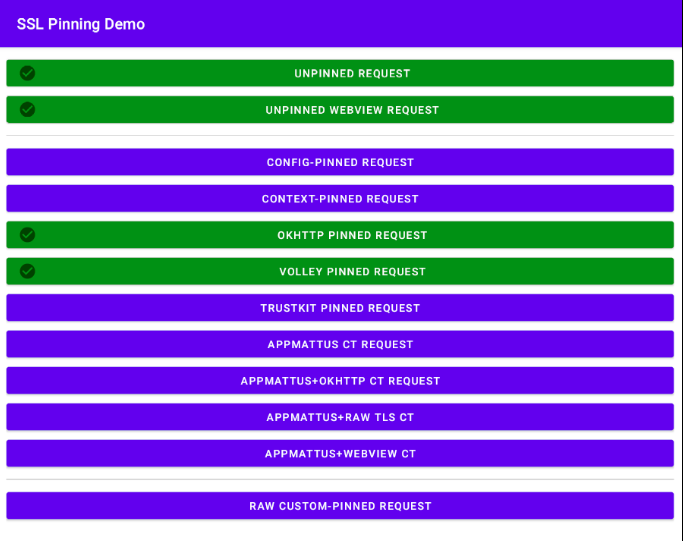
From an implementation perspective, there are a lot of different approaches here. However, from a cert signature perspective (excluding certificate transparency) there are about two major ones:
- cert hash (mostly sha256 or sha1)
- full root ca public key
Cert hash (mostly sha256 or sha1)
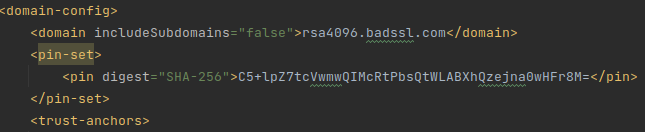
Most commonly a digest of the public cert is used for pinning, either sha256, sha1 or seldomly md5. This can be done in various places, but its typically either hardcoded within the main program or the network_security_config,xml file.

Full root ca public key
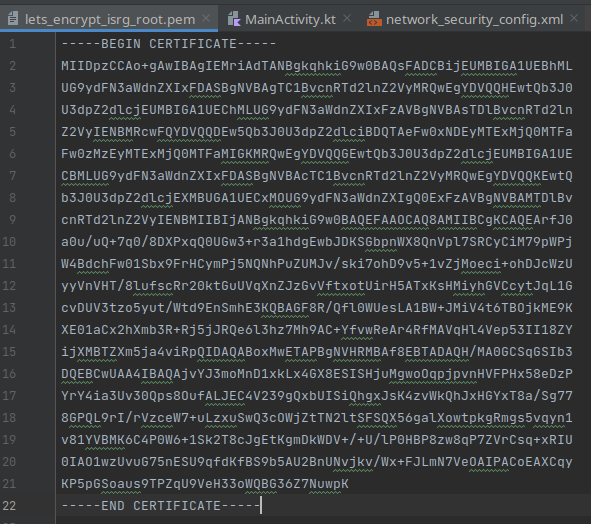
Alternatively, the full public certificate is used for pinning, this is typically either in a DER or PEM (base64 of DER) format. Due to its size, it is usually not stored as a literal within the program, but separately as a file somewhere in the application resources.

Now to bypass this, you can either hook the functions or just patch the binary. However I’ve had too much fun in life, so I wanted to find a harder, much less reliable approach that might not even be possible, which would accomplish the exact same thing.
Given that we want to have an approach that works even when we cannot fully reverse the application, we need to be able to get the data used for cert pinning another way. This can be accomplished with the OpenSSL CLI given we have the domain (typically in Burp error logs on dashboard). Alternatively, Frida can be used to hook the socket at libssl level to get the domain.
We pull the cert chain of the website since they might not necessarily be using the root cert for pinning:
openssl s_client -showcerts -verify 5 -connect ecc384.badssl.com:443 < /dev/null | awk '/BEGIN CERTIFICATE/,/END CERTIFICATE/{ if(/BEGIN CERTIFICATE/){a++}; out="cert"a".pem"; print >out}';Where ecc384.badssl.com would be your website. Using the retrieved PEM certs (base64 of DER), we calculate the sha256/sha1 hashes:
for cert in $(ls cert*.pem);do
openssl x509 -in $cert -pubkey -noout | openssl rsa -pubin -outform der 2>/dev/null | openssl dgst -sha256 -binary | openssl enc -base64 | xxd -p
done

// hex output for our domain
3437444551706a38484253612b2f54496d572b354a4365755165526b6d354e4d704a575a473368537546553d0a
6a514a5462496830677277302f31546b4853756d57622b46733047676f67723632316754335076504b47303d0a
43352b6c705a37746356776d7751494d6352745062735174574c41425868517a656a6e613077484672384d3d0a

// base64 (remove last "| xxd -p" to get this)
47DEQpj8HBSa+/TImW+5JCeuQeRkm5NMpJWZG3hSuFU=
jQJTbIh0grw0/1TkHSumWb+Fs0Ggogr621gT3PvPKG0=
C5+lpZ7tcVwmwQIMcRtPbsQtWLABXhQzejna0wHFr8M=
Last one look familiar? (Yes, I’ve seen this hash too many times). Now to get the hash we need to replace it with, i.e. our Burp CA cert hash:
openssl x509 -in cacert.der -pubkey -noout | openssl rsa -pubin -outform der | openssl dgst -sha256 -binary | openssl enc -base64We then use Frida with the hex of the base64 of the sha256 hash of the CA public cert that we calculated. Notice how this is slowly getting more convoluted? These are stored in the certArray var and the hash of our Burp CA hash set as the certSHA256 var:
var certSHA256 = 'R9dq3yq5SKCGTr7AeuSx1rKpcQNswJzeI0N+5kLZEL8=';
var certSHA1 = 'o8pXXPAa7+Wl9f4Qz4BNr7KuAsQ='; //not used
// convert to byte array
var certByteArray = certSHA256.split('').map((c) => c.charCodeAt(0));
// hex of the base64 cert sha256 hashes.
var certArray = ['3437444551706a38484253612b2f54496d572b354a4365755165526b6d35','6a514a5462496830677277302f31546b4853756d57622b46733047676f67','43352b6c705a37746356776d7751494d6352745062735174574c41425868']

Java.perform(function(){
// Get main module
  var module = Process.enumerateRangesSync('rw-')[0];
//  setInterval(function() {
    // should perhaps use a map for this.
    for (let i = 0; i < certArray.length; i++) {
      var cert = certArray[i];
      // console.log(cert);
      Memory.scan(module.base, module.size, cert, {
        onMatch: function(address, size) {
          console.log("Pattern "+ certArray[i] +" matched @ " + address);
          //console.log(hexdump(address, {length: 12}));
          console.log("Overwriting with data...");
          address.writeByteArray(certByteArray);
          //console.log(hexdump(address, {length: 12}));
        }
      })
    }

 // }, 50);
});
console.log("Script finished loading");
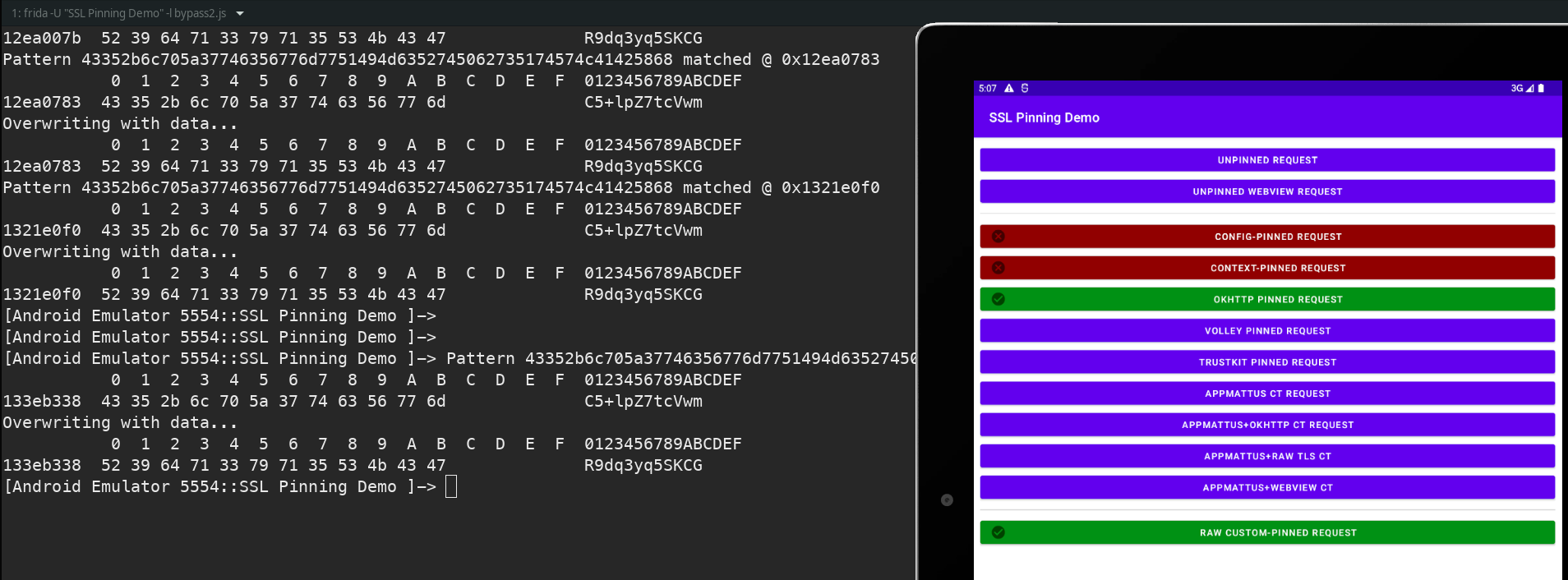
This enables us to bypass two of the cert pinning checks:
Since I already wrote the script and needed the functionality, I thought it was worth adding to objection as well (https://github.com/sensepost/objection/pull/656). The functionality could be used in the following manner:
memory replace "<search pattern eg: 41 41 ?? 41>" "<replace value eg: 41 50>"
// --string-pattern is used to specify the search input is a string.
// --string-replace is used to specify the replace input is a string.
Further for convenience, I created an objection plugin that automates the prior commands to calculate the certificate hashes as well as to perform the subsequent search and replace functionality. Although, it is built for demonstration purposes meaning its not optimised and has very little error checks.
It can be loaded by specifying the containing folder using the -P flag, for example:
objection -n app -s start -P plugin_folder/At the time of writing this plugin, there are three simple commands:
plugin certpinutils retrieve_chain_hashes <domain>

plugin certpinutils cert_sha256 <burp_cert_location>

plugin certpinutils replace_hashes
Note: the prior two commands have to be run first.
It can be downloaded from here:
https://github.com/sensepost/memunpin
The same replacement attempt was made with the full cert, albeit not very successfully. With this approach it is no longer a simple string comparison since the cert gets loaded into a X509 data structure / keychain as well as into an ASN data structure which perform object comparisons in a different and manner.
Thus the timing becomes more difficult if we were to perform direct string replacement. This is because the PEM cert has to be replaced before the OpenSSL X509Certificate is initialised.
While this can potentially be done by hooking the file reader, you might as well just patch the file in the APK in that case.
So, I was only able to get this to succeed by utilising the debugger to pause the application and then do the replacement.
One approach that brought about a different error indicating some progress, was to throttle the network of the emulator, as this provided a larger opportunity before certs from the server were received. Though, this was ultimately not successful since at that point the X509 cert object used by OpenSSL – created by Conscrypt3 – was already initialised, and used a different format to store the cert data.
I am still in the process of trying (and failing) to understand the structure of OpenSSL’s public key format, as well as where all the relevant logic and checks are for the cert chain construction / comparison. This also differs between libraries used and some of which do comparisons on the ASN structure within the Java execution space.
How is OpenSSL invoked?
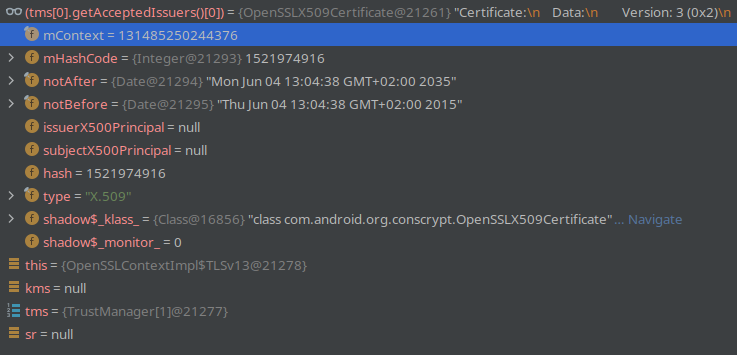
The Conscrypt Java object has a member variable called mContext4 which is of type long, but is actually a pointer to a X509 struct; this is done to avoid Java’s garbage collection. This pointer is used whenever OpenSSL functions are called, which are declared as native functions in NativeCrypto5. Side note, I found there was a previous exploit, CVE-2015-38256, that used this parameter to obtain kernel code execution which I found interesting.
To get an idea of how things look, I grabbed the value of mContext using the Android Studio debugger within the SSL context initialization:
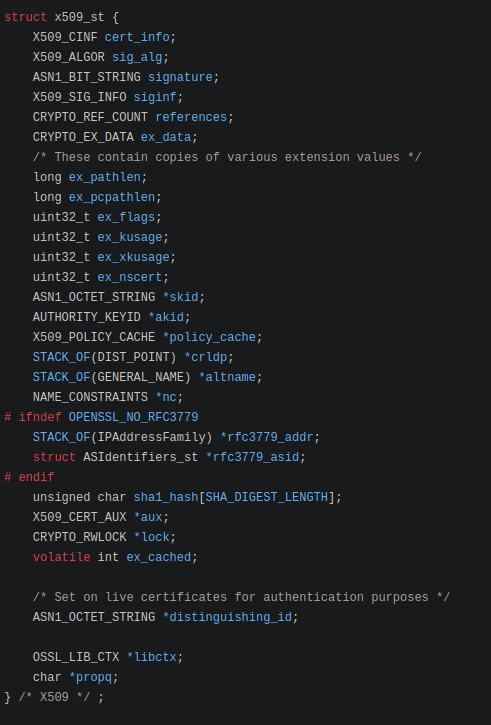
For the first part of the X509 struct, we are only really interested in cert_info for now:
Thus we can use the mContext value to access the struct elements using Frida. The mContect variable is actually a Java long which stores a pointer value to the C struct:
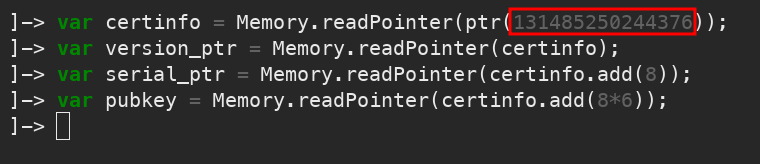
Reading at the certinfo address (declared line 1 in above screenshot), we can see how the memory maps to the struct of cert_info. It also explains line 2-4 of the previous screenshot:
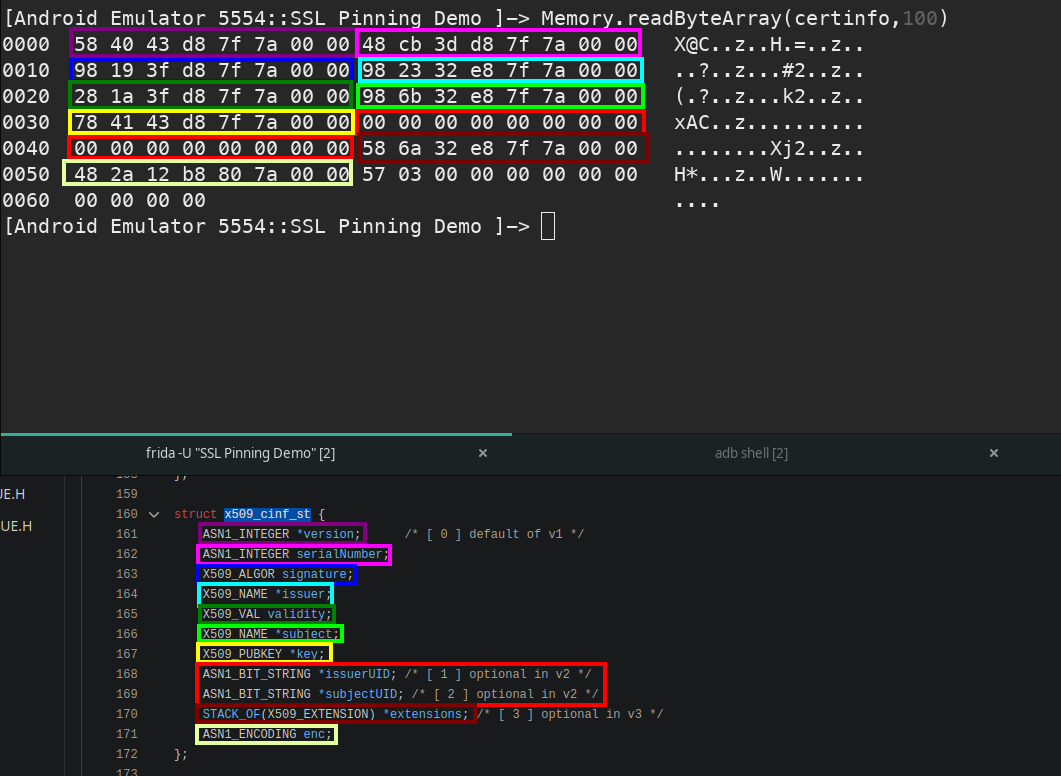
Evaluating the OpenSSL code further we can see the process it uses to obtain the publickey:
https://github.com/openssl/openssl/blob/master/crypto/x509/x509_cmp.c#L388
https://github.com/openssl/openssl/blob/master/crypto/x509/x_pubkey.c#L31
Essentially it is: X509 -> cert_info.key -> pkey
Where X509 would be mContext.
Or in struct naming terms:x509_st -> x509_inf_st -> x509_pubkey_st ->evp_pkey_st
A more visual representation (starting with x509_st):
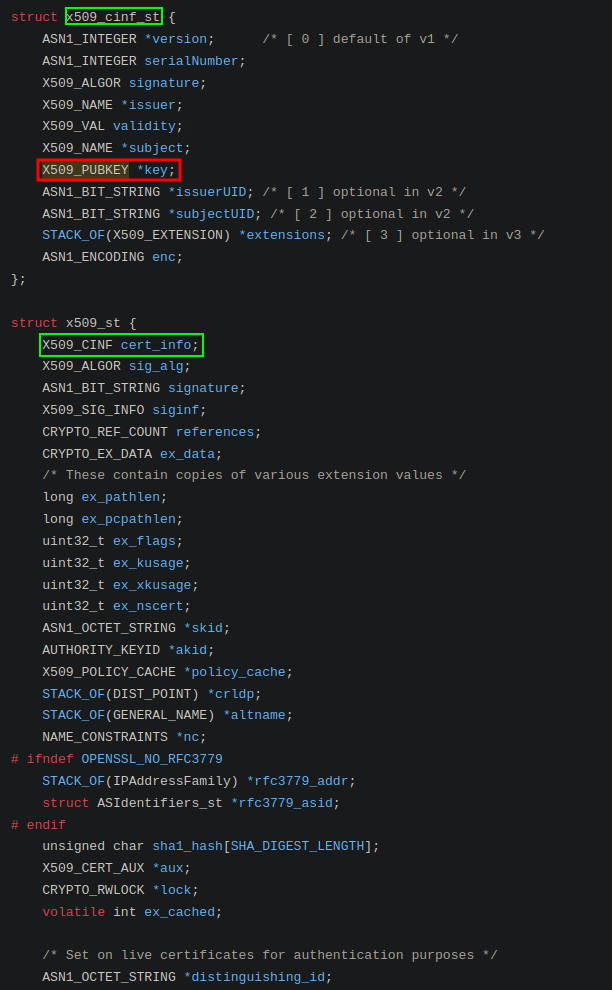
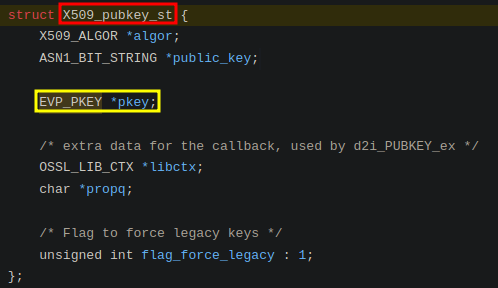
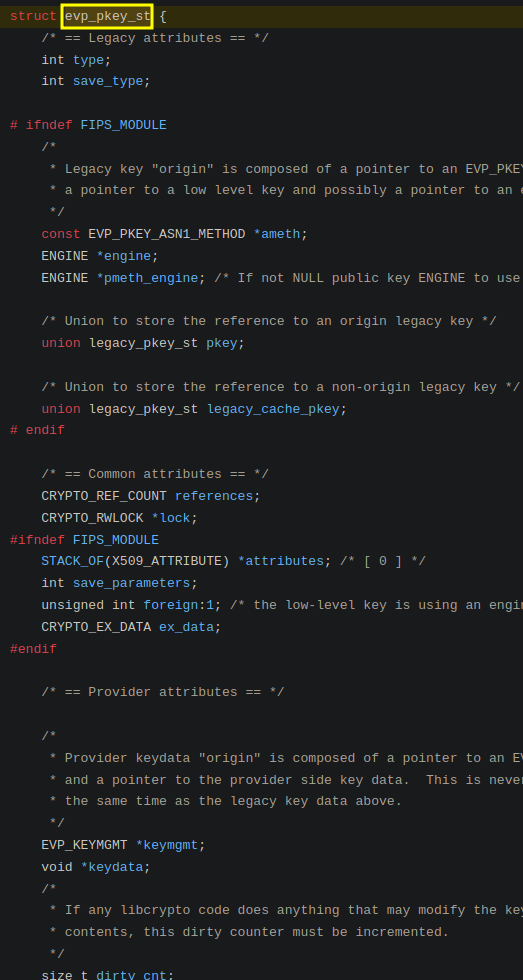
What now? I have attempted to create another X509 initialization using my Burp CA and then replacing the pkey pointer with that, though to no avail – I have tracked down some potential suspects on the Java side though.
I have mostly been performing negative testing to find the relevant elements, i.e. I have disabled the proxy and then attempted to induce an error in the cert chain validation process by modifying specific values. If it then fails, then I know it is a key component that will have to be factored into the search & replace.
Conclusion
At this point, I still have very little understanding of the pkey structure and how to reconstruct it. Since I will need to be able to reconstruct it or at least locate it to potentially replace its X509 parent object reference, this is something that will still need to be worked on.
While I suspect there will be additional checks within the Java code for the cert chain that are also failing, most operations rely on OpenSSL to retrieve any cert related data such as the name or validity dates.
If you have any suggestions or feedback, feel free to reach out to me, as well as if you spot something. I am sure I missed some things, the longer you are busy with something the worse the tunnel vision gets.
Lessons learnt
X509 is pain (and raw ASN.1 in general).
- Using a fail fast, fail often approach was useful for avoiding rabbit holes which had little or no chance of success. This was done by shortening the feedback loop, in addition to testing only the most critical elements to each approach first.
- Using Android studio debugger together with Frida proved effective for isolative and iterative testing.
- When doing experimental testing, building tools to automating time consuming elements once they have been determined as requirements proved very useful for consistency and reducing keyboard smashing.
Other resources and references:
https://github.com/iddoeldor/frida-snippets/blob/master/README.md
https://github.com/openssl/openssl/blob/master/include/crypto/x509.h#L39
https://www.openssl.org/docs/man3.0/man3/i2d_X509.html
References:
- https://github.com/google/boringssl/blob/05fb4bcd239ec7bd7db0d606dcf131e62e24509e/ssl/ssl_x509.cc#L17 ↩
- https://github.com/httptoolkit/android-ssl-pinning-demo/ ↩
- https://github.com/google/conscrypt/blob/master/common/src/main/java/org/conscrypt/OpenSSLX509Certificate.java ↩
- https://github.com/google/conscrypt/blob/4b9f688b241f73a89ba1eb8871b302062c1790ff/common/src/main/java/org/conscrypt/OpenSSLX509Certificate.java#L64 ↩
- https://github.com/google/conscrypt/blob/master/common/src/main/java/org/conscrypt/NativeCrypto.java ↩
- https://www.usenix.org/system/files/conference/woot15/woot15-paper-peles.pdf ↩